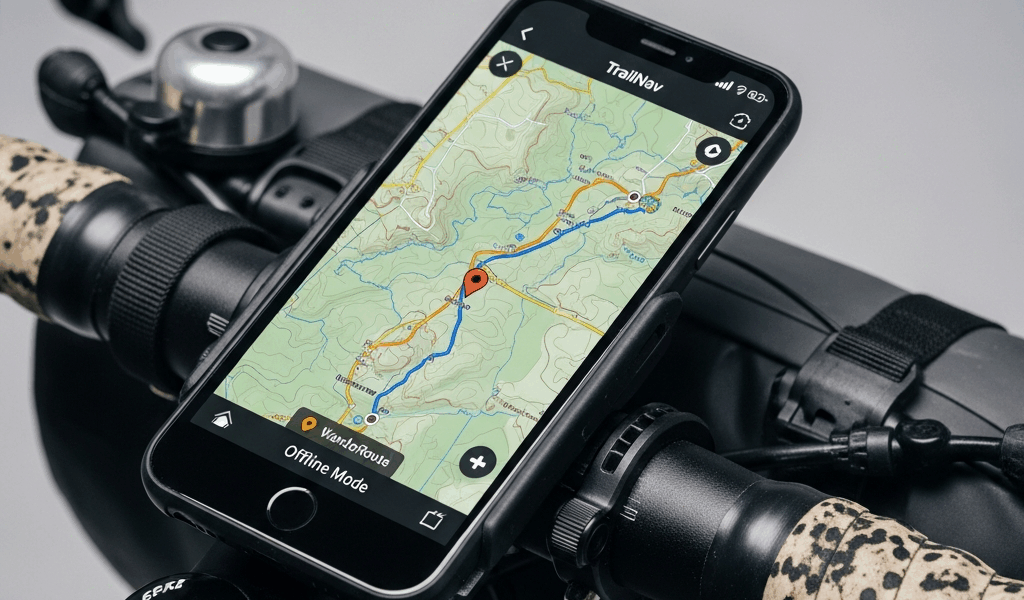
Best Bikepacking Navigation App — What to Use When You Are Off-Grid
Finding the best bikepacking navigation app is not the same problem as finding a good cycling app. I learned this the hard way on a four-day route through the Colorado San Juans, about 40 miles from the nearest town, when my carefully cached Strava route decided it needed a data connection to display the next turn. It didn’t get one. I had a paper screenshot of the elevation profile and a vague memory of the GPX file I’d uploaded. That was a long afternoon. The requirements for bikepacking navigation are genuinely different — not slightly different, fundamentally different — and most app roundups miss this because they’re written by road cyclists who treat “offline mode” as a nice-to-have rather than the entire point.
This article includes affiliate links. We may earn a commission at no extra cost to you.
What Bikepacking Navigation Needs That Road Cycling Apps Don’t
Garmin Connect, Wahoo’s app, even Strava — these tools are built around the assumption that your phone has a signal most of the time. They cache some data, sure. But “cached tiles” and “full routable offline maps” are not the same thing, and the difference matters at mile 60 of a remote gravel route when you haven’t had cell service since breakfast.
Here’s what bikepacking navigation actually requires, in order of importance:
- Fully offline routable maps — not just visual tiles but maps the app can actually navigate from, recalculate from, and display turn-by-turn cues from without any network request.
- GPX/TCX file import — bikepacking routes live as GPX files. The Kokopelli Trail, the Arizona Trail, virtually every published bikepacking route on the internet exists as a GPX download. If an app can’t import those cleanly and display them accurately, it’s not a bikepacking tool.
- Battery efficiency — a GPS-on, screen-active phone running navigation all day on a bikepacking route will die. Most phones get 6–8 hours of active GPS use. Multi-day routes run 8–12 hours per day of riding. The app matters here. Some are dramatically heavier than others.
- Topographic detail with surface type data — gravel, doubletrack, and hike-a-bike sections don’t look the same as pavement on a standard map. You need apps that distinguish surface types and show meaningful elevation data, not the smoothed-out elevation curves that road cycling apps show.
Road cycling apps fail on points one and four almost categorically. That’s the gap we’re filling here.
Komoot vs Ride with GPS vs Gaia GPS — The Three Main Options
These are the three apps that actually show up in serious bikepacking conversations, and they’re not interchangeable. Each one has a specific strength.
Komoot
Komoot is the best route planning tool of the three. Full stop. The surface type data is genuinely excellent — it distinguishes paved, unpaved, gravel, and hiking paths using OpenStreetMap data combined with a large community of user edits. Planning a bikepacking route inside Komoot feels like planning, not just drawing lines on a map. You see the surface breakdown, the elevation profile, and estimated time based on your fitness level.
Offline maps work via purchasable region packages. A small region like a single US state section runs around $4.99; broader regions go up to $29.99. You buy them once, download them to your device, and they work completely offline. The Komoot free tier actually includes one free region download — enough to test the system before committing. Battery drain is moderate; in my testing on a Pixel 7, I was seeing roughly 18–22% battery per hour with screen on, which is in the middle of the pack.
The weakness: Komoot’s route planning is great for routes you build yourself but clunky when following an externally-created GPX. The import works, but the app sometimes tries to “correct” your route to its preferred roads, which is infuriating when someone spent hours designing a specific line through remote terrain.
Ride with GPS
Ride with GPS is the clearest choice when you are following someone else’s route. The GPX import is the cleanest of any cycling-specific app — drop a file in, it displays accurately, cue sheets generate automatically, and the turn-by-turn audio cues work reliably. The route library is large, and the community sharing features are well-built.
Offline maps require a premium subscription at $79.99 per year (as of this writing). That’s the main friction point. On premium, you download your route plus a surrounding corridor of map tiles — the process takes a few minutes on Wi-Fi and works completely without a signal afterward. Battery consumption is the lightest of the three, which matters on day three of a multi-day route when you’re rationing charge from a 10,000mAh Anker bank.
Where Ride with GPS falls short is topographic detail for truly remote terrain. The map layers are good, not exceptional, and the offline functionality is tile-based rather than vector-based, meaning you need to pre-download at the specific zoom levels you’ll actually use.
Gaia GPS
Gaia GPS is an outdoor navigation app that cyclists have adopted, not a cycling app. That distinction matters. The map layers are the best available — USGS topo, OpenCycleMap, Sentinel satellite imagery — and the offline download system is genuinely excellent. You can download a specific corridor at multiple zoom levels and the vector-based rendering means files stay manageable even for large areas.
Burned by a situation where I needed to identify whether a faint line on my route was a rideable doubletrack or a seasonal drainage ditch, Gaia GPS’s satellite layer answered the question immediately. No other app in this list does that as well.
The cost is battery. Gaia is the heaviest of the three on power — I’ve seen 28–30% battery per hour on screen-active navigation, which means a full day of riding on an iPhone 14 without supplemental power is marginal. The route planning tools are also barebones compared to Komoot. Use Gaia GPS for the map detail; use something else for planning.
How to Set Up Offline Maps Before You Leave — All Three Apps
Probably should have opened with this section, honestly, because setup is where most people lose the thread.
The rule that applies across all three apps: download on Wi-Fi the night before departure, not at the trailhead. Not at the parking lot. The night before. Cellular data is slow for large map downloads, patchy at rural trailheads, and the one time you skip this step is the one time something goes wrong.
- Komoot: Go to your route, tap the download icon, confirm the region is purchased and downloaded. Regions are large packages — downloading San Juan Mountains coverage takes around 400–600MB depending on detail level.
- Ride with GPS: Open your route, tap the offline maps option (premium required), select the download corridor width (2 miles on either side is usually sufficient), choose your zoom levels (12–17 covers most use cases), and download. Expect 200–500MB for a full day’s route.
- Gaia GPS: Use the area download tool to draw a box or corridor around your route. Download at zoom levels 10 through 16 minimum. Gaia lets you see the estimated file size before confirming — anything over 1GB suggests your download area is too large; trim it.
After downloading: turn on airplane mode. Open the app. Verify your route displays. Tap around to confirm map tiles load. This takes four minutes and has saved multiple trips. If something is broken, you want to find out on your couch, not at a trailhead with no cell signal.
The Verdict — Which App for Which Bikepacking Type
There is no single best bikepacking navigation app. The right choice depends on what you’re actually doing.
- Self-supported multi-day route following a published GPX (Kokopelli, AZTR, a friend’s route file) — use Ride with GPS. The import accuracy and cue sheet quality are unmatched for this specific use case, and the lighter battery drain pays off on long days.
- Planning your own route and navigating it in the same workflow — use Komoot. The surface data and planning tools are the best available, the offline system is clean, and the one-time region purchase model works out cheaper than an annual subscription if you’re not riding constantly.
- Remote routes where terrain reading matters — high alpine, desert backcountry, unfamiliar wilderness — use Gaia GPS alongside Ride with GPS. Run Ride with GPS for your route cues and turn notifications, Gaia GPS for reference when you need to verify terrain. Yes, two apps. It works.
- Budget setup: Komoot’s free tier plus one purchased region covers most weekend bikepacking trips. The base app is free, one region download is included, and additional regions are $4.99 and up. Functional and affordable.
One more honest note: if you are planning trips longer than three days, consider a dedicated Garmin device — the eTrex 32x at around $249 or the Edge Explore 2 at $349 — alongside whatever phone app you choose. Managing phone battery on a bikepacking route is genuinely difficult. A phone is a fragile, battery-hungry thing being asked to do a job it wasn’t designed for. A dedicated GPS device changes the math. The phone apps above are the right tools for most trips; for serious multi-day self-supported routes, redundancy is worth the weight.



Stay in the loop
Get the latest adventure cycling world updates delivered to your inbox.